Embroidery digitizing for production

Professional Embroidery Digitizing Services

Naan Designs prepares custom embroidery files for commercial embroidery shops, apparel decorators and other businesses in the USA and worldwide. Send your artwork for caps, left chest logos, uniforms, jackets, patches and 3D puff embroidery.

Choose common machine formats such as DST, PES and EXP or request native editable Melco OFM and Wilcom EMB files for compatible workflows.

  • Flat rate service options
  • Editable OFM and EMB options
  • Online order management
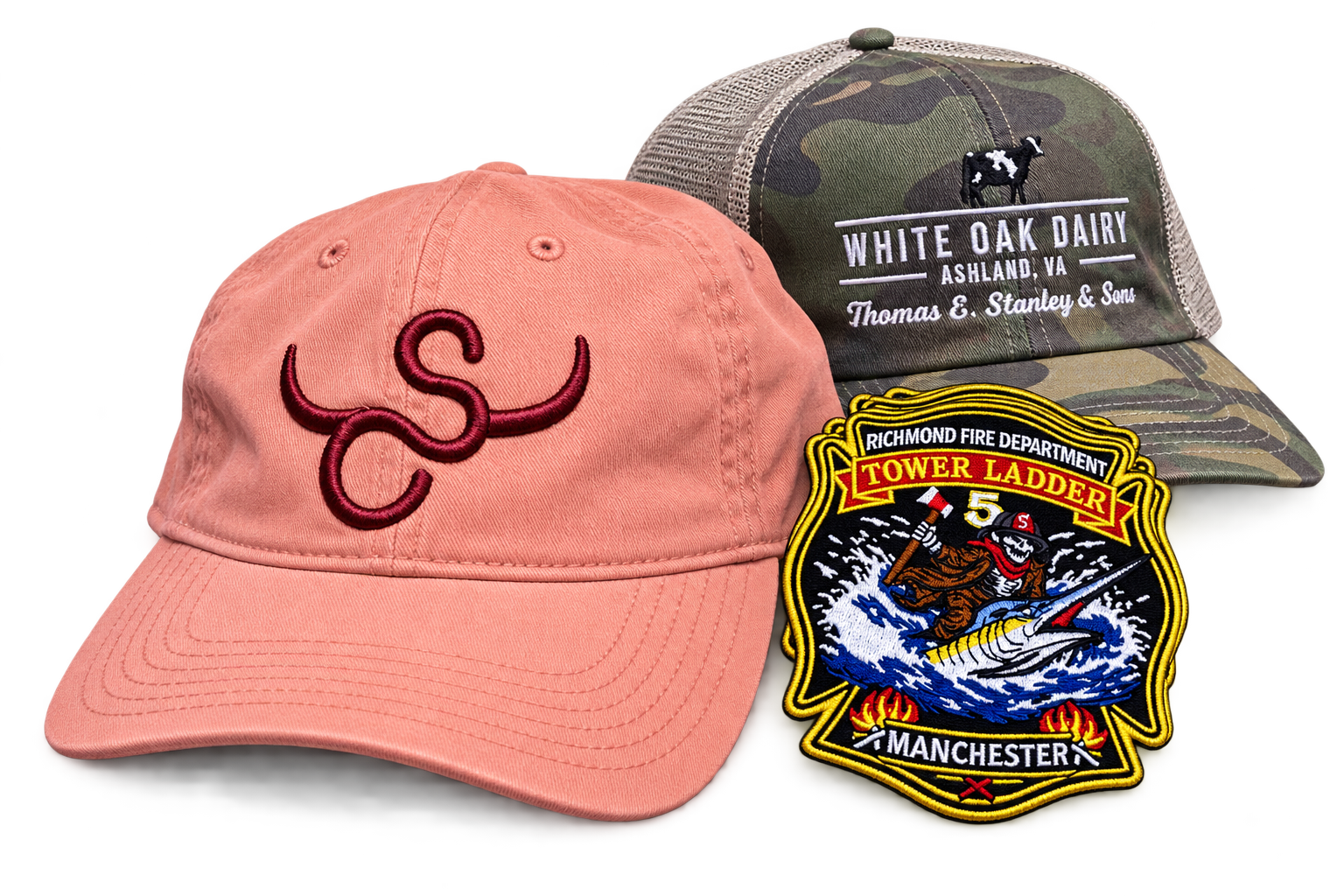
Examples of custom embroidery digitizing and finished stitched designs
Transparent PricingClear service options and flat rates with no hidden fees.
Editable OFM and EMB FilesNative files for compatible Melco and Wilcom software.
Rush Service AvailableChoose the turnaround that fits your production schedule.
Online Order TrackingManage your orders and files from start to finish.
Easy Online Ordering

How It Works

Start with the garment and the finished size of your design. Those two details help determine whether a cap, polo, jacket or patch needs a different approach before you select the file format and turnaround.

  1. 1
    Upload Your ArtworkSend your logo, finished size and garment details.
  2. 2
    Choose Your OptionsSelect your file format, service level and turnaround time.
  3. 3
    We Digitize Your DesignYour embroidery file is prepared for your production needs.
  4. 4
    Download and ManageDownload finished files and request edits in your account.

Embroidery Digitizing Prices

Choose the turnaround that works for your schedule. These prices apply to standard left chest, cap and 3D puff designs. Jacket backs and other applications have separate pricing.

Basic

$28
12 business hours

For embroidery projects with a shorter production schedule.

  • Faster turnaround than Budget
  • Specify your garment, artwork size and file format
  • Manage completed files and edit requests online
Start a Basic Order

Rush

$50
5 business hours

For qualifying projects that need the quickest turnaround.

  • Shortest listed turnaround option
  • Useful when production is scheduled soon
  • Submit artwork and instructions through your account
Start a Rush Order

Business hours are Monday through Friday, 9 AM to 5 PM Central Time. Turnaround is counted only during business hours. Confirm the current price and service level in your order.

See all applications and current pricing →

See Our Embroidery Work

View available work examples and sample file information. Examples help you evaluate applications and choose the format you need.

Embroidery Software and File Formats

Machine stitch formats and editable design files serve different purposes. Use Melco and Wilcom when you need native editable files. Choose common machine formats for production ready output.

Melco DesignShop logo
Melco DesignShop Native editable OFM embroidery files for compatible Melco workflows.
Wilcom EmbroideryStudio logo
Wilcom Native editable EMB embroidery files for compatible Wilcom workflows.
DST
DSTTajima machine format
PES
PESBrother machine format
EXP
EXPMelco and Bernina format
JEF
JEFJanome machine format
VP3
VP3Husqvarna format
HUS
HUSHusqvarna format
XXX
MoreOther supported formats

For the latest Melco software information, visit our Melco OFM service page. Learn more about Wilcom EMB digitizing and DST, PES and EMB file differences.

Digitizing Built Around Your Garment

Applications We Digitize

  • Left chest logos and uniforms
  • Structured and unstructured caps
  • 3D puff embroidery
  • Jacket backs and larger designs
  • Embroidered patches
  • Small lettering when finished size permits

What We Consider

  • Fabric movement and stability
  • Underlay, stitch density and coverage
  • Stitch direction and object sequencing
  • Push and pull compensation
  • Trims, jumps and travel paths
  • Thread weight and needle details when supplied

Specialized Digitizing Services

Explore services based on the embroidery application and the editable files you need.

Prepare Your Artwork for Digitizing

Upload the clearest version of your logo or image. Include your finished design size, garment or material, and required embroidery file format. For example, a cap may need different digitizing choices than a polo using the same artwork. You can manage order information, completed files and edit requests in your customer account.

Additional resources: prepare artwork, small lettering, and digitizing fundamentals.

Embroidery Digitizing Questions

These are the most common questions customers ask before ordering embroidery digitizing.

Can a JPG or PNG image run directly on an embroidery machine?

No. JPG and PNG files are images, not embroidery stitch files. Digitizing prepares stitch instructions for a compatible embroidery machine.

What is the difference between DST and editable OFM or EMB files?

DST is a common machine stitch file. Native Melco OFM and Wilcom EMB files support editable design workflows in compatible software. Select the file type that fits your equipment and editing requirements.

Do cap designs need different digitizing than left chest logos?

Often yes. Cap shape, center seams, hooping and stitching order can affect the design construction. Include the garment application in your order.

How is turnaround calculated?

Budget, Basic and Rush times are counted during business hours, Monday through Friday from 9 AM to 5 PM Central Time. Orders near closing may continue into the next business day.

Can I request edits after delivery?

Yes. Use the edit request option in your customer account to keep changes connected to the original order.

Learn About Embroidery Digitizing

For more detail on stitch construction and production decisions, explore our education guides.

Ready to Start Your Embroidery Order?

Send your artwork, design size, garment and requested format through your Naan Designs customer account.

Create Free Account
Loading…